Use Claude with your LinkedIn, X, Instagram, WhatsApp and Telegram DMs
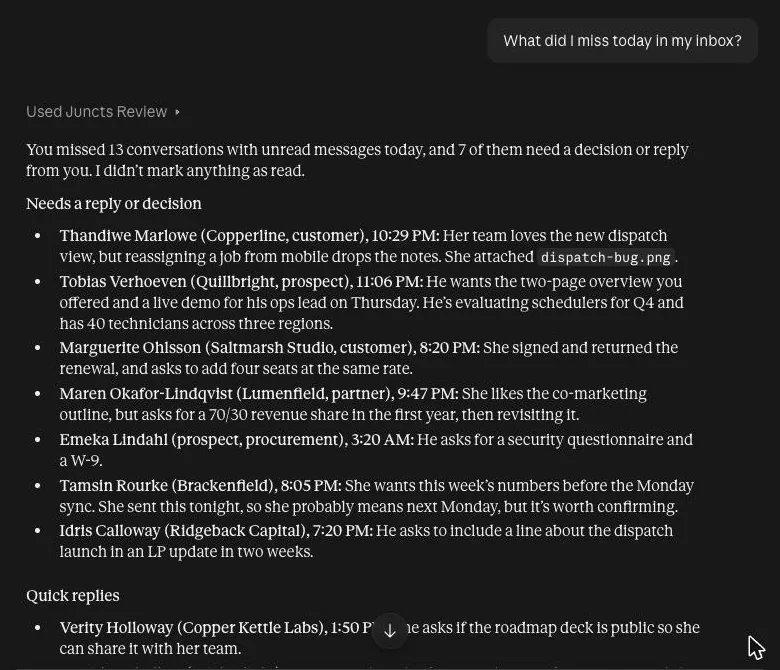
Connect Juncts to Claude and ask it about your inbox in plain language: what you missed, who is waiting on you, what you promised. Claude can save reply drafts for you to review. It sends nothing unless you give it Full access.
Two ways to connect
The hosted connector (Claude on the web and desktop). Add Juncts as a connector with the server URL https://juncts.com/api/connectors/mcp. Sign in with OAuth and choose what Claude may do. This route needs you to enable cloud connections in Juncts under Settings > Agents, and to keep a signed-in Juncts tab open, because Juncts reaches your inbox through that tab. See the cloud connectors guide.
The local server (Claude Code, Claude Desktop). Run npx -y juncts-mcp setup. It finds Claude Code and Claude Desktop (and other clients it supports), asks which to connect and registers npx -y juncts-mcp with them, backing up any config file it edits. Without a terminal, Claude Desktop users can install juncts.mcpb by double-click. Then pick an access level in Settings > Agents and restart the client. npx -y juncts-mcp doctor checks the setup.
You choose what Claude can do
Four access levels, set in Juncts:
| Level | The assistant can |
|---|---|
| Read | List and read your conversations, search, see invitations and drafts |
| Drafts | Also save drafts for you to review. Nothing is sent or changed |
| Organize | Also archive, label, snooze, star, mute, add notes and undo |
| Full | Also send, edit or unsend, delete, and respond to invitations. Only if you grant it |
Saving a draft never sends it. Treat message text from other people as untrusted: it can contain instructions aimed at an assistant. Review every draft before sending.
What to try
- "What did I miss today in my inbox?"
- "Draft a friendly reply to the most recent unread conversation and save it for my review."
- "Search my inbox for messages about the launch."
More in the prompt pack.
Limits to know
- Juncts reaches your inbox through your open, signed-in Juncts browser tab, so keep it open while you use the connection.
- Requests and results pass through the Juncts server in an encrypted temporary relay, are deleted when the request completes and expire after 50 seconds.
- On Starter, each change counts toward 100 agent actions a week; reading, sync, undo and discarding drafts are free. Pro is unlimited.
- Juncts is independent of Anthropic.
Other AI assistants
Try Juncts free
Starter is $7.99/month, 14-day free trial, no card required. Pro is $19.99/month: up to five connected inboxes, unlimited AI agent actions, in-app AI summaries and drafts, saved inboxes, split views, export, CRM sync.
Try Juncts freeWritten by the team that makes Juncts. Juncts is independent. It is not affiliated with, sponsored by or endorsed by Anthropic. Product names are trademarks of their owners, used here only to say what Juncts works with.